Free for hosts
Parking Instructions
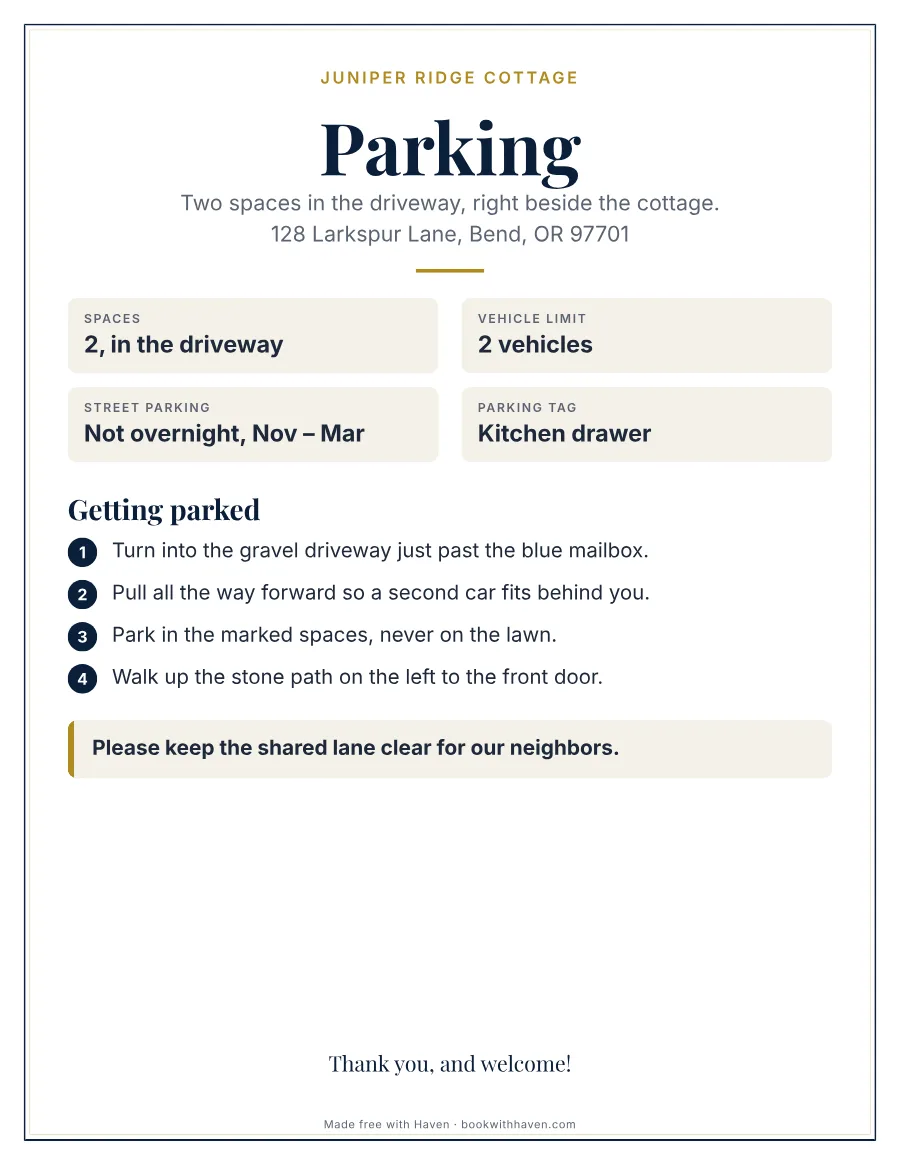
A photo of your driveway or street with the space marked, plus the directions in words. Send it before arrival and leave a copy inside.
What to include
What to include in parking instructions
Parking is the first thing a guest has to get right, and the first thing a neighbor notices when they do not. A marked photo settles it before the car stops.
A photo with the space marked
Your driveway, garage or street, with a pin, arrow or box on the exact spot.
How many cars, and where the second one goes
The number of spaces, and the nearest legal place for an extra car.
Where not to park
A neighbor’s space, a shared driveway, a fire lane, or the street on sweeping or snow days.
Permits, passes and gates
Where a hang tag goes, how a gate opens, and any code guests need on the way in.
The address and the approach
The street address in large type and a landmark for the turn, for the guest reading it from the car.
How it works
Make yours in a few minutes
- 1
Add your photo
Take it from where guests arrive, in daylight, wide enough to show the turn.
- 2
Mark the space
Pin, arrow or box, each with a short label such as “P” or “Guest spot”.
- 3
Write the directions
A few lines on cars, permits and where not to park; the address fills in from your shared details.
- 4
Download, send and print
Attach the PDF to your check-in message and leave a printed copy by the door.
Questions hosts ask
Parking instruction questions
What should Airbnb parking instructions include?
Where to park, how many cars fit, where not to park (a neighbor’s space, a fire lane, the street on sweeping days), any permit or pass and where it goes, and what to do about a second car. A photo with the exact space marked answers most of it at a glance.
Should I send the parking instructions before arrival?
Yes. Guests need parking before they reach the door, so send the PDF or the same text with your check-in message, and leave a printed copy inside for the second car or the trip back from dinner.
How do I mark the parking space on the photo?
Add a photo of the driveway or street, then place a pin, arrow or box on the space and label it. The marks stay on the same spot at every print size.
Is my driveway photo uploaded anywhere?
No. Photos are read and resized in your browser, kept on this device with the rest of your draft, and only leave it inside the PDF you download.
Free for hosts
Pairs well with
Frequently asked
Is Parking Instructions really free?
Yes — Parking Instructions is free for vacation-rental hosts. No signup, no credit card, no email gate. Haven runs a paid hosting platform for direct-booking sites, and these tools are how we introduce it.
Why is Haven offering this free?
Because the best way to demonstrate what Haven can do for a vacation-rental site is to actually do something useful first. You keep the answer either way.
Free traffic, too: list your rental in Haven's guest search
Haven's AI stay search sends travelers to independently-run rentals at no cost. Connect Airbnb or your PMS, and each place gets a free Haven site that collects booking requests. How free listing works