Vacationrentalpricingautomation
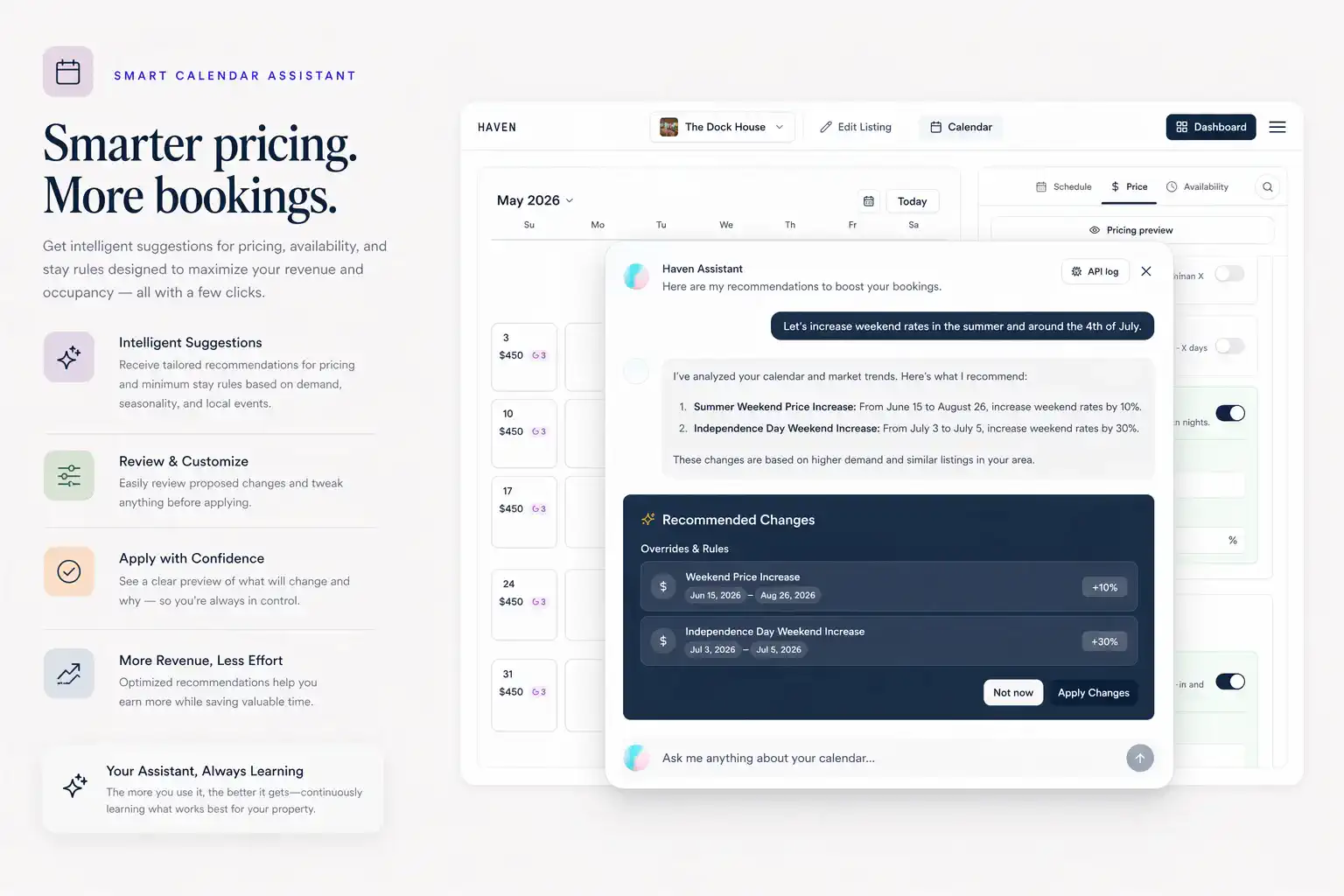
Describe a pricing, availability, or rule change for a single property or your whole portfolio in plain language. Calendar AI drafts a structured proposal — scoped by location, distance, tags, bedroom count, season, or any combination — surfaces conflicts, and waits for your approval before anything ships to the branded booking site.
Spell calendar edits in plain language when AI assist is enabled, reconcile conflicts across seasons, funnel updated quotes straight into your Haven storefront, and orchestrate portfolios the same way high-touch property managers operate—minus the brittle spreadsheets.
No credit card required
Real prompts. Real changes.
Calendar AI is not a chatbot for guest messaging — it is a structured-mutation system for hospitality operations. Tell it what you want changed, and it drafts the exact edit across every affected property.
“Raise weekend rates 10% across my Mexico properties within 50 miles of the coast, June through August.”
“Block all my Tahoe cabins from December 22 to January 2 — owner stays.”
“For every 4-bedroom in my portfolio, set a 4-night minimum on Memorial Day, July 4th, and Labor Day weekends.”
“Drop nightly rates 15% on any property that has been vacant 14+ days, but never below $180.”
“Add a stay-5-pay-4 promo to my desert properties for September only.”
“Match the pricing on my Joshua Tree A-frame to my Pioneertown cabin, but keep its existing minimum-stay rules.”
Every proposal is reviewed and approved by you before it updates your branded booking site.
What you can manage
Every rule is a building block Calendar AI can scope, compose, and ship — or you can edit any of them by hand.
Portfolio-scoped changes
Update rates, blocks, minimums, or promos across properties scoped by city, distance from a point, tags, bedroom count, amenity, or any combination — applied as a single approved change.
Nightly rates
Update base rates, date-specific prices, and seasonal pricing.
Availability
Block or unblock dates on your booking calendar.
Minimum stays
Set minimum-stay rules for specific dates, weekdays, weekends, or seasons.
Discounts
Create discount codes, stay-length discounts, and returning-guest offers from the same plain-language box.
Promotions
Add limited-time offers for slower periods or specific date ranges.
Holiday and event pricing
Adjust pricing for high-demand dates without rebuilding your calendar.
Calendar changes should not take all afternoon.
Hosts need to adjust rates, block dates, create discounts, and update minimum stays without digging through scattered settings.
Pricing changes pile up
Weekends, holidays, seasons, and special events all need different rules.
Availability changes need care
Blocks, overrides, and existing bookings have to stay aligned.
Small updates take too many clicks
A simple change can turn into a long settings hunt.
See the review-before-publish flow — every AI proposal waits for your approval.
Dec 24–26 blocked · Weekdays → $899
2 changes · December 2026
Calendar AI
Chat-driven pricing and availability changes.
Overrides & Rules
Block dates
Weekday pricing
What you control
- Update rates and availability
- Create minimum-stay rules
- Add discounts and promotions
- Review changes before publishing
Pick the dates. Set the rule. Preview the guest quote.
A tight loop: select nights, apply pricing and stay rules, then confirm what the booking page will show — before you publish.
July 2026 · Direct calendar
Guest preview
3 nights · $975 subtotal
Matches the weekend rule before you publish.
One sentence. Any scope. Reviewed before it ships.
Describe a change for one property or your entire portfolio — by region, distance, season, tags, bedroom count, or any combination. Calendar AI drafts a structured proposal, surfaces conflicts, and waits for your approval before anything goes live on your branded booking site.
Scope it however you think
Single property, a tagged group, by city, by distance from a point, by amenity, by bedroom count — Calendar AI understands the shape of your portfolio.
Compose any rule
Combine rates, minimum stays, gap rules, blocks, discounts, promotions, and seasonal bands into one request — applied as a single structured change.
Review the diff before it ships
Every proposed change is a typed object: dates, properties, before-and-after values, conflicts. Approve, edit, or discard before it touches your calendar.
How pricing and calendar updates work
From a date range to a published rule — with a preview in between so surprises do not reach guests first.
- 1
Choose the dates
Select the date range, season, weekend, holiday, or event window. - 2
Set the rule
Update pricing, availability, minimum stays, discounts, or promotions. - 3
Check for conflicts
Calendar AI surfaces existing bookings, blocked dates, and overlapping rules before anything ships — conflicts are flagged in the proposal, not discovered after. - 4
Preview the change
Confirm what guests will see before it goes live. - 5
Publish to your booking calendar
Apply the update to your Haven booking page.
Built for your booking calendar control.
Works with your existing channel mix. Native PMS connectors and Haven’s direct Airbnb integration keep listing, pricing, calendar, and reservation data aligned; Haven manages the branded booking calendar on top.
Generic calendars
Good for blocking dates, but not built for booking rules, pricing, discounts, and guest checkout.
Spreadsheets
Flexible, but easy to forget and disconnected from the booking page.
Dynamic pricing tools
Useful for pricing strategy, but often separate from booking pages and guest-facing checkout.
Haven
Connects branded booking pricing, availability, rules, promotions, and booking pages in one workflow.
Who it's built for
Hosts with seasonal pricing
Adjust rates for summer, holidays, ski season, weekends, or local events.
Hosts managing owned bookings
Control the pricing and availability guests see on your Haven booking page.
Multi-property hosts
Keep calendar updates more organized across multiple rentals.
Hosts using promotions
Create discounts or offers for slower dates, repeat guests, or longer stays.
Pair it with
Related solutions
Pair automation with Haven’s branded vacation rental website builder and see how scaling teams orchestrate catalogs inside direct booking software for property managers.
Frequently asked questions
Next step
Keep availability honest and revenue intentional.
Ship calendar updates, complex rate bands, and promo windows without abandoning the branded site experience you’ve already published.